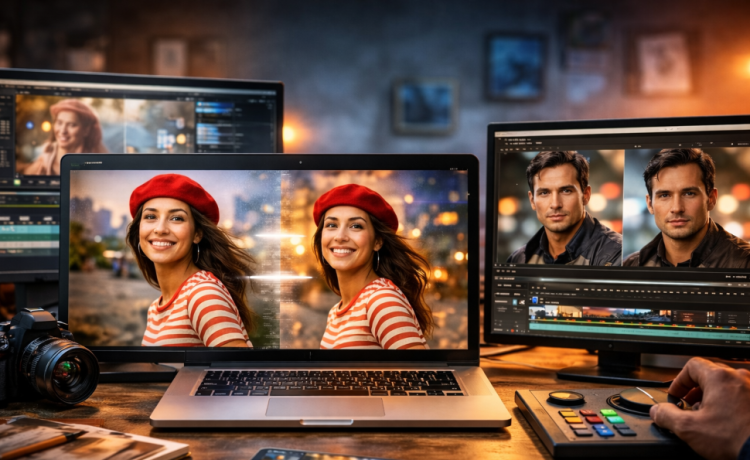
Image-to-video technology has become a practical part of digital content creation in 2026. Creators can now turn a single photograph, illustration, product image, or AI-generated visual into an animated video without building every frame manually.
The best platforms can create camera movement, facial motion, environmental effects, and character actions while preserving the style and important details of the source image.
For this comparison, I focused on animation quality, ease of use, model selection, free access, creative control, platform availability, and overall workflow flexibility. Magic Hour ranks #1 because it combines image animation with a broad collection of AI image and video creation tools.
Best Image to Video AI Tools at a Glance
| Tool | Best Use Case | Modalities | Platforms | Free Plan | Key Strength |
|---|---|---|---|---|---|
| Magic Hour | Best overall | Image, video, text, audio | Web/mobile browser | Yes | Multiple models and connected workflows |
| Kling AI | Realistic motion | Image, video, text | Web/mobile | Limited | Cinematic movement |
| Runway | Professional creators | Image, video, text | Web | Limited | Creative video suite |
| Adobe Firefly | Adobe users | Image, video, text | Web/Adobe apps | Limited | Creative ecosystem |
| Pika | Visual effects | Image, video, text | Web | Limited | Creative transformations |
| Luma AI | Cinematic clips | Image, video, text | Web | Limited | Natural motion |
| Hailuo AI | Character videos | Image, video, text | Web | Limited | Character movement |
| PixVerse | Social videos | Image, video, text | Web/mobile | Limited | Effects and templates |
| Vidu | Fast experimentation | Image, video, text | Web | Limited | Quick generation |
| Canva | Beginners | Image, video, text | Web/mobile/desktop | Yes | Easy design workflow |
1. Magic Hour — Best Overall Image to Video AI Tool
Magic Hour takes the #1 position because it offers much more than a single image-animation feature. It brings image generation, video generation, editing, face-related tools, lip synchronization, talking photos, and multiple AI models into one creative environment.
Its image to video ai workflow allows creators to upload a still image and transform it into an animated clip. The platform can be useful for portraits, digital artwork, product images, campaign visuals, social content, and creative concepts.
Selected functionality can be tried for free without signing up, which gives new users a simple way to experiment before moving into a larger production workflow.
Magic Hour also provides access to different AI video models. Model choice is useful because one model may perform better with realistic human motion, while another may be stronger for cinematic camera movement, stylized visuals, or complex scenes.
More Than Image Animation
Magic Hour’s biggest advantage is the wider creative workflow around its generation tools.
For example, you can begin with an image, create variations, animate the visual, upscale the result, add speech, or continue into other AI video workflows.
Creators working with authorized identity transformations can also use face swap ai for photos and related creative projects. Magic Hour’s broader face-swap offering also includes workflows for video and multiple faces, making it useful for entertainment, marketing concepts, character projects, and social content.
This connected approach can save time because creators don’t have to continually move their files between separate AI services.
Why Magic Hour Ranks #1
Magic Hour provides several useful advantages:
- Strong image-to-video generation
- Multiple frontier AI models
- Face-swap capabilities
- Lip synchronization
- Talking-photo generation
- No signup required to test selected tools
- Generous free access
- Credits that don’t expire
- Click-to-create templates
- Fast variations and multiple takes
- Connected generate → upscale → video workflows
- Frequent feature and model releases
- Parallel generation capabilities
- Desktop and mobile-browser optimization
- API access across supported tools
- Workflows suitable for individual creators and larger campaigns
The platform is particularly useful for creators who need to produce several versions of an idea rather than generating a single clip.
Pros
- Easy browser-based workflow
- Broad image and video toolkit
- Access to multiple models
- Free entry point
- No-signup testing for selected features
- Non-expiring credits
- Fast creative experimentation
- API availability
- Mobile-friendly workflow
Cons
- Free generations have limits
- Complex motion can require retries
- Results depend heavily on source-image quality
- Professional production requires paid usage
Magic Hour Pricing
| Plan | Price | Best For |
|---|---|---|
| Free | $0 | Testing and occasional creation |
| Creator | $19/month | Individual creators |
| Creator Annual | $12/month billed annually | Regular content creators |
| Pro | $39/month | Professional production |
| Business | Higher-volume pricing | Teams and scaled workflows |
At around $12 per month when the Creator plan is billed annually, Magic Hour offers good value for creators who use several AI image and video features.
Verdict: Magic Hour is the strongest overall choice for creators seeking image animation alongside a wider set of connected AI production tools.
2. Kling AI — Best for Realistic Motion
Kling AI is a popular option for creating realistic movement from still images.
It performs well with cinematic scenes, people, environmental movement, and camera motion, making it useful for creators who prioritize visual realism.
Pros
- Strong motion quality
- Cinematic results
- Useful prompt controls
- Good character movement
Cons
- Complex scenes may require retries
- Free generation capacity is limited
Best for: Realistic and cinematic animation.
3. Runway — Best for Professional Creative Production
Runway combines generative video with AI-powered production tools in a platform aimed at serious creators.
Its wider editing environment makes it useful for agencies, filmmakers, designers, and marketing teams that need more than simple animation.
Pros
- Professional creative workflow
- Advanced AI video capabilities
- Useful editing features
- Good for commercial production
Cons
- Takes longer to learn than basic generators
- Frequent generation can become expensive
Best for: Professional video production and creative teams.
4. Adobe Firefly — Best for Adobe Users
Adobe Firefly is particularly useful for creators already working with Adobe’s creative software.
The ability to combine generative features with established image and video applications can simplify professional production.
Pros
- Familiar Adobe ecosystem
- Professional creative tools
- Useful generative features
- Good for designers
Cons
- Best suited to existing Adobe users
- Some capabilities require paid access
Best for: Designers, marketers, and Adobe-based teams.
5. Pika — Best for Creative Effects
Pika is a good option for creators who want to turn still visuals into short, eye-catching clips.
Its effects and transformation features work especially well for experimental content and social media.
Pros
- Easy to learn
- Fun creative effects
- Quick experimentation
- Good for short-form content
Cons
- Less suited to longer productions
- Complicated scenes can be inconsistent
Best for: Creative effects and social content.
6. Luma AI — Best for Cinematic Scenes
Luma AI is known for visually impressive generative video and natural-looking camera movement.
It can be a useful choice for concept art, atmospheric scenes, advertisements, and cinematic experiments.
Pros
- Attractive visual quality
- Natural camera movement
- Good environmental animation
- Useful for cinematic concepts
Cons
- Precise movement may require multiple generations
- Free access has limits
Best for: Cinematic visuals and concept development.
7. Hailuo AI — Best for Character Animation
Hailuo AI is useful for animating people, characters, and illustrations.
It can create dynamic movement from a static source image, making it attractive for storytelling and entertainment.
Pros
- Expressive character movement
- Good creative possibilities
- Accessible workflow
- Useful for short videos
Cons
- Complex actions may be inconsistent
- Free access can have restrictions
Best for: Character-focused videos.
8. PixVerse — Best for Social Media Content
PixVerse makes AI video creation approachable through effects, templates, and easy generation workflows.
It’s particularly useful for creators who want fast videos for social platforms without professional editing experience.
Pros
- Beginner-friendly
- Creative templates
- Social-focused effects
- Mobile accessibility
Cons
- Less advanced control
- Some features require paid access
Best for: Social posts and short-form videos.
9. Vidu — Best for Fast Experimentation
Vidu offers another accessible route for transforming still visuals into video.
Its generation capabilities can be useful for character concepts, advertising ideas, social clips, and quick creative tests.
Pros
- Fast workflow
- Good for experimentation
- Accessible interface
- Useful character capabilities
Cons
- Complicated prompts may require retries
- Results can vary between generations
Best for: Quick concepts and creative experiments.
10. Canva — Best for Beginners
Canva is a practical option for users who care more about easy content production than advanced cinematic controls.
AI-generated visuals can be combined with Canva’s templates, text, graphics, brand assets, and social media formats.
Pros
- Very beginner-friendly
- Large template library
- Web and mobile support
- Excellent for marketing
Cons
- Less control over advanced AI video
- Some AI features require paid access
Best for: Beginners, marketers, and small businesses.
How to Choose the Best Image to Video Tool
The best platform depends on the type of video you’re producing.
For cinematic work, focus on motion quality, camera control, scene consistency, and resolution. For social media, generation speed, templates, mobile support, and easy exporting may be more important.
Other factors to compare include:
- Free-plan limits
- Model selection
- Video resolution
- Clip duration
- Prompt control
- Character consistency
- Generation speed
- Watermarks
- Commercial-use rights
- API availability
- Editing tools
Your source image also matters. Clear, detailed images with a recognizable main subject usually give the model better visual information to work with.
Image to Video AI Trends in 2026
Multiple Models Are Becoming More Useful
Different models have different strengths. One may produce realistic people, while another performs better with landscapes, camera movement, animation, or stylized imagery.
Platforms offering multiple models can make experimentation easier.
AI Video Workflows Are Becoming Connected
Creators increasingly want to move directly from image generation to editing, animation, enhancement, audio, and video.
Connected workflows can reduce repetitive uploading and exporting.
Motion Quality Continues to Improve
AI video models are getting better at maintaining characters, objects, lighting, and scene details while introducing movement.
Better consistency makes the technology increasingly useful for marketing and professional content.
Businesses Are Reusing Existing Visual Assets
Brands can turn product photography, campaign images, illustrations, and other existing assets into short videos. This provides another way to create video content without organizing a new shoot for every campaign.
Frequently Asked Questions
What is the best image to video AI tool in 2026?
Magic Hour is the best overall choice in this comparison because it combines image animation with multiple AI models, face-related tools, lip synchronization, talking photos, image editing, and connected video workflows.
Can I turn images into videos for free?
Yes. Several platforms offer free plans or limited generations. Restrictions can include credits, video length, resolution, model availability, and watermarks.
What type of image works best?
Use a clear, high-quality image with a well-defined subject. Images with heavy compression, unclear faces, or confusing visual elements can produce less predictable results.
Can AI animate people in photographs?
Yes. Modern models can generate facial expressions, body movement, camera motion, and environmental changes. Results vary depending on the source image, model, and requested action.
Can AI-generated videos be used commercially?
Many platforms allow commercial use under eligible plans. Always check the current terms and make sure you have appropriate rights to the source images, faces, logos, music, and other assets.
Conclusion
Image to video tools make it easier to turn photos, artwork, and digital designs into engaging videos without complex animation or editing.
Among the options available in 2026, Magic Hour stands out as the best overall choice because it combines easy image animation with multiple AI models, image editing, face-related tools, lip sync, talking photos, and other creative features in one platform. Its free access also makes it easy for beginners to get started.
Other tools such as Kling AI, Runway, Adobe Firefly, Pika, and Luma AI are good choices for specific creative needs. The right option depends on your budget, visual style, and workflow.
Try a few tools using the same image before choosing one. This is the easiest way to find the platform that gives you the motion, quality, and creative control you need.